WP Social Chat
Our take
The simplest conversion tool in this catalog: one click moves a visitor from your page into a WhatsApp conversation with your team. It does not try to be a helpdesk — no tickets, no inbox — and that focus is the point. Just remember the conversation happens on WhatsApp, so the data is theirs, not yours.
Good
- One click from the site into a WhatsApp conversation
- Multiple agents with individual numbers
- Customizable chatbox, colors, icons and welcome message
- Pre-filled user messages to start chats with context
- Lightweight — no external dashboard or subscription
Watch out
- Conversations live in WhatsApp, not in WordPress
- No ticketing or chat history on your site
- GPL download comes without vendor support or auto-updates
Works well with
- WooCommerce
- WhatsApp Business
Every small business knows where its customers already are: WhatsApp. Contact forms get ignored, email chains die, but a WhatsApp message gets answered. WP Social Chat by QuadLayers exploits exactly that habit — a chatbox on your WordPress site that hands the conversation to WhatsApp in one click. Version 8.3.13 is offered on this page as a GPL-licensed release.
A button that becomes a conversation
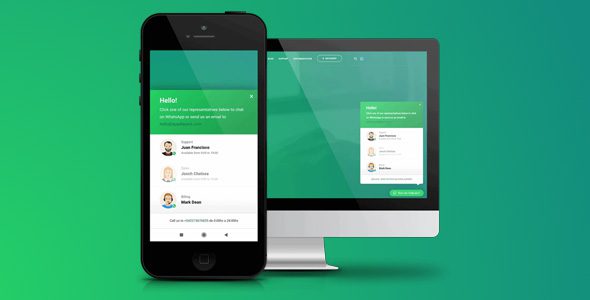
The flow is deliberately short. A visitor clicks the floating button, sees a chatbox with your welcome message, picks or writes their opening line — pre-filled messages can carry context like the product they were viewing — and the conversation opens in the WhatsApp app or WhatsApp Web. No accounts, no dashboards, no new tool for the customer to learn. For the visitor it feels like messaging a business the way they message a friend.
A team, not a number
Multiple agents are the Pro headline: each team member gets their own number, name, label and custom message, so sales questions reach sales and support questions reach support. The chatbox presents them properly — this reads as a business with a team, not a sole trader’s phone number taped to a website. Colors, icons and agent avatars all customize, so the widget matches the site instead of shouting over it.
Setup in minutes, not evenings
There is no channel configuration to speak of: no API keys, no business verification, no webhook plumbing. The plugin needs your agents’ numbers and a welcome message, and the chatbox is live. That simplicity is why it wins adoption against heavier chat tools — the cost of trying it is fifteen minutes, and the cost of removing it is one toggle. The flip side is the dependency: if WhatsApp is down or your market prefers another messenger, the button is decoration.
The honest trade-off
This plugin is not a helpdesk, and it does not pretend to be. Conversations happen inside WhatsApp — the history, the data and the notifications live on WhatsApp’s servers, not in your WordPress database. For a small team that already runs on WhatsApp, that is the feature: zero new infrastructure. For a team that needs searchable ticket history and SLAs, a helpdesk plugin is the right tool and this is the wrong one.
WP Social Chat vs the alternatives
Within this catalog, Chaty Pro — also by QuadLayers — is the multi-channel option, stacking WhatsApp alongside Messenger, Telegram and a dozen other channels in one widget. WP Social Chat is the single-channel specialist with the deeper WhatsApp chatbox. At the other extreme, Resolai answers questions with AI from your content — a different bet entirely. Most small stores want the simplest thing that works: that is this plugin.
Who it suits
Local businesses and small shops whose customers live on WhatsApp; stores that want pre-sales questions answered in minutes, not ticket queues; service businesses where a conversation closes the deal better than a form.
WP Social Chat free download: latest version
WP Social Chat 8.3.13 is offered here as a GPL-licensed release, checked before publication. Install via Plugins → Add New → Upload Plugin, add your agents with their numbers, write a welcome message that sounds like you, and test the full click-to-chat flow from your phone.
Install from the zip file
Download the zip on this page. In WordPress, go to Plugins, then Add New, then Upload Plugin. Choose the file, click Install Now, then Activate. Stuck? See our step-by-step guide to installing a plugin from a ZIP.
Is WP Social Chat free?
A free version exists on the WordPress.org directory covering the basic button and chatbox. Pro — distributed here under GPL terms — adds multiple agents and the deeper customization.
WP Social Chat vs Chaty: which is better?
Chaty Pro is the multi-channel sibling — WhatsApp plus Messenger, Telegram and more in one widget. WP Social Chat does WhatsApp only, with a fuller chatbox: custom welcome and pre-filled messages. WhatsApp-only stores lean WP Social Chat; multi-channel sites lean Chaty.
How does the chat actually work?
The visitor clicks the button, sees the chatbox with your welcome message, and taps to open the conversation in WhatsApp — on the app or WhatsApp Web. From there the chat lives in WhatsApp, which your team already knows how to answer.
Can several team members take chats?
Yes. Multiple agents can be configured with their own numbers, each with a custom name, label and message, so visitors reach the right person — sales, support or a specific store.
Does it slow the site down?
The plugin is a button and a chatbox — there is no external dashboard connection or heavy script bundle, so the performance footprint stays minimal.
How do I update WP Social Chat?
Replace the plugin files with the new zip — agents and settings live in the database. The routine is in our guide: How to update a premium WordPress plugin manually.
What are WP Social Chat's weaknesses?
Chats and their history live in WhatsApp rather than on your site, there is no ticketing layer, and a GPL download ships without vendor support.