Conditional Shipping and Payments for WooCommerce
Our take
A problem-solver rather than a daily driver: install it the day a wholesaler asks for bank transfer only, or a fragile product needs courier-only shipping. Stores with one flat shipping rule will never open the settings twice.
Good
- Controls gateways, shipping methods and destinations from one screen
- Rules per product, category or shipping class
- Customer-role and membership conditions
- Works with subscriptions and coupons
Watch out
- Only useful when you actually need restrictions
- Many conditions mean careful testing per rule
- Another WooCommerce extension to keep updated
Works well with
- WooCommerce
- PayPal
- Stripe
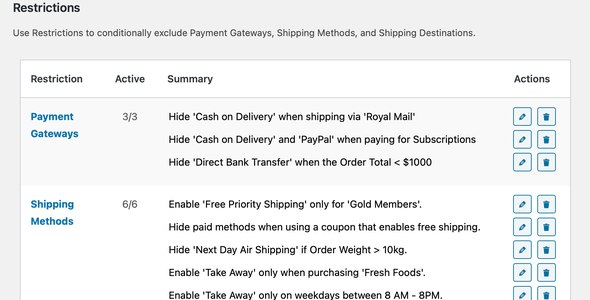
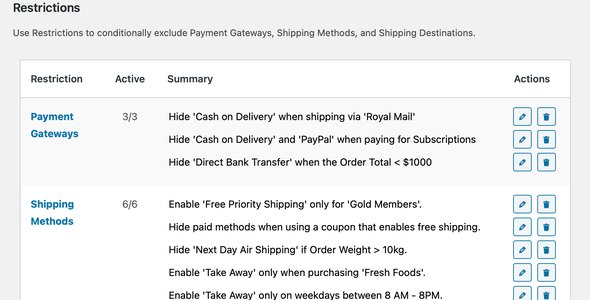
Every store eventually hits the same awkward request: “bank transfer for wholesale buyers only”, “no cash on delivery for orders over €500”, “this fragile item ships by courier, never standard mail”. WooCommerce has no built-in answer, so Conditional Shipping and Payments exists — a rules engine that decides which payment gateways, shipping methods and destinations a customer is allowed to see.
Version 3.2.2 of this WordPress plugin is available for download on this page under the GPL license.
Key features
- Gateway restrictions. Show or hide payment methods per product, product category or shipping class; by weight, item count or cart total; when a coupon is applied; or when the order contains a subscription.
- Shipping method rules. Limit flat rate, local pickup or any other method by destination, package contents or order value.
- Country and state control. Restrict shipping destinations globally, or only when specific products are in the cart — handy for goods with regional regulations.
- Customer-aware conditions. Individual customers, roles and site members can each receive their own payment and shipping options.
- Billing-country and currency logic. Match rules to the billing address or order currency for cross-border stores.
Typical use cases
A B2B store gives the “wholesale” role bank transfer and invoice terms while retail customers see cards and PayPal. A furniture shop offers free shipping only when the cart contains no oversized shipping class. A supplement brand excludes a handful of countries from specific product lines due to regulations. Each scenario is a two-minute rule instead of custom code.
How it behaves day to day
Rules evaluate silently at checkout: customers simply never see options that don’t apply, which keeps the checkout clean rather than erroring out. Because conditions stack, start with the broadest rule and add exceptions, then test with a real account in each role you target.
Free download: latest version
Conditional Shipping and Payments for WooCommerce 3.2.2 is available for download here under the GPL license. Upload the zip via Plugins → Add New → Upload Plugin, activate on top of WooCommerce, and find the rules under the extension’s settings tab.
Install from the zip file
Download the zip on this page. In WordPress, go to Plugins, then Add New, then Upload Plugin. Choose the file, click Install Now, then Activate. Stuck? See our step-by-step guide to installing a plugin from a ZIP.
Can I hide a payment gateway for specific products?
Yes. Gateways can be restricted per product, category or shipping class, and further conditioned on cart total, applied coupons or customer role.
Can I block shipping to certain countries?
Yes. Countries and states can be excluded globally, or only when particular products are in the cart — useful for items you cannot legally or practically ship everywhere.
Does it work with WooCommerce Subscriptions?
Yes. Conditions can target subscription purchases specifically, so recurring orders can have their own gateway and shipping rules.
Can wholesale customers get different payment options?
Yes. Rules based on customer roles or memberships show different gateways to different groups — bank transfer for approved wholesale accounts, cards for everyone else.
Is Conditional Shipping and Payments free?
No. It is a commercial extension sold through the official WooCommerce marketplace, with updates and support included in the license.
Does it slow down the checkout?
No meaningful impact — the rules evaluate server-side in milliseconds. Keeping the ruleset tidy and non-overlapping is a maintenance concern, not a performance one.
Why is my gateway still showing despite the restriction rule?
Check the rule conditions for a mismatch first — an empty condition means the rule never fires. Then confirm your checkout is excluded from page caching, because a cached checkout page will happily show yesterday's gateway list.