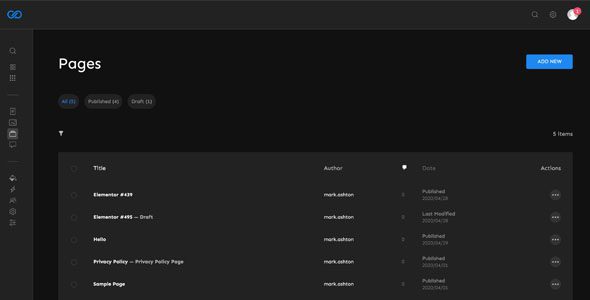
UiPress Pro
Our take
The fastest way to make wp-admin feel like a modern app, and the white label plus role-based menus genuinely help at client handover. Budget an hour for testing against plugins that ship their own admin styling before rolling it out everywhere.
Good
- Modern app-like admin: dark mode, global search, media folders
- White label and role-based menu control for client projects
- Per-user preferences — each admin keeps their own layout
- Google Analytics widget right on the dashboard
Watch out
- Restyles admin only — zero effect on the frontend
- Occasional CSS collisions with plugins that ship custom admin styles
- GPL download comes without vendor support
If you spend your day inside wp-admin — or hand sites over to clients who do — the default dashboard starts to feel dated fast: a cluttered menu, a media library with no folders, no dark mode. UiPress Pro replaces that interface with a clean, app-like admin theme while leaving WordPress itself untouched. This page offers the plugin for download under the GPL license.
What UiPress Pro changes in wp-admin
The plugin reskins the whole admin area and adds the tools the default interface never got. A global search jumps to posts, pages, users and settings from one box. The media library gains real folders and a built-in image editor, so you can crop or flip an image without leaving the library. Dark mode is available per user, menu items can be reordered or hidden per role, and a Google Analytics widget puts traffic numbers right on the dashboard. Custom CSS and JS fields let you push the admin further without editing core files.
White label and client handover
For agencies the killer feature is white label. You can replace WordPress branding with the client’s logo and colors, hide menu sections the client should never touch, and hand over a dashboard that looks like a custom-built panel. Combine that with role-based menu control and an editor sees posts and media only, while the shop manager sees orders — no more frightened phone calls about the settings screen. It sits naturally in a toolkit of admin tools aimed at client work.
Practical notes before you roll it out
Two habits save real time here. First, test your busiest admin screens after activation: plugins that ship their own admin styling — some page builders and reporting tools — can produce minor visual collisions inside a reskinned dashboard, and it is better to catch that on a staging copy than during a client demo. Second, document whatever you hide. Role-based menu control is powerful, but six months later nobody remembers where the settings went. Keep a note of hidden items per role in your project docs.
Dark mode and layout preferences are stored per user, so each team member keeps their own setup — worth knowing before you assume a global switch exists. And when you debug an admin-side issue, temporarily deactivating UiPress is a fast way to rule out style conflicts: if the problem disappears with the default admin back, you know where to look. The built-in image editor handles quick crops and rotations well, but it works on library items one at a time — bulk work still belongs offline.
Who it suits
Agencies and freelancers who hand over dashboards to clients; membership, e-learning and directory sites where non-technical users live in wp-admin daily; and anyone who simply wants dark mode and a searchable, folder-based media library in their own workspace.
UiPress Pro free download: latest version
This page offers the GPL-licensed release of UiPress Pro, checked before publication. Upload it via Plugins → Add New → Upload Plugin, activate, and the new dashboard loads immediately — configuration lives under the UiPress menu, where you can enable dark mode, set up white label and tune the menu per role at your own pace.
Install from the zip file
Download the zip on this page. In WordPress, go to Plugins, then Add New, then Upload Plugin. Choose the file, click Install Now, then Activate. Stuck? See our step-by-step guide to installing a plugin from a ZIP.
Is UiPress Pro free?
No. It is a premium admin dashboard plugin, distributed here under the GPL license.
Does UiPress change how my site looks to visitors?
No. It restyles only the WordPress admin area. Your frontend theme and pages stay untouched.
Will it slow down wp-admin?
The assets load only inside the admin area, and the interface is built to feel faster than the default thanks to global search and the reworked media library.
Does it work with WooCommerce and page builders?
Yes, it runs alongside them. Plugins that ship heavy custom admin styling can occasionally clash visually, so test your key admin screens after activation.
How do I install it?
Upload the ZIP via Plugins → Add New → Upload Plugin and activate. Our plugin installation guide walks through it step by step.