JetAppointment
Our take
The Elementor-native answer to appointment scheduling: services and providers are template-driven, payments come from WooCommerce, and notifications hook anywhere. Sites not on Elementor should look at standalone booking plugins.
Good
- Hourly appointments with days off and buffer time
- 12 custom field types on booking forms
- Smart notifications and post-submit hooks
- Custom templates for providers and services
- WooCommerce payment support
Watch out
- Elementor-centric workflow
- Finest results with JetEngine alongside
- Setup involves several moving parts
Works well with
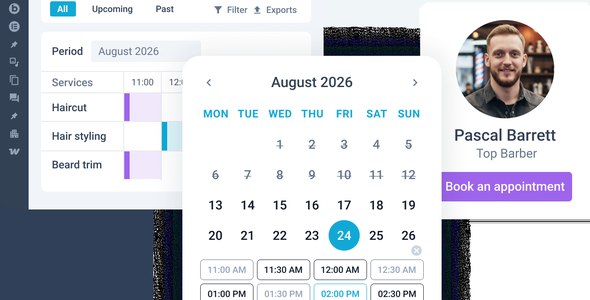
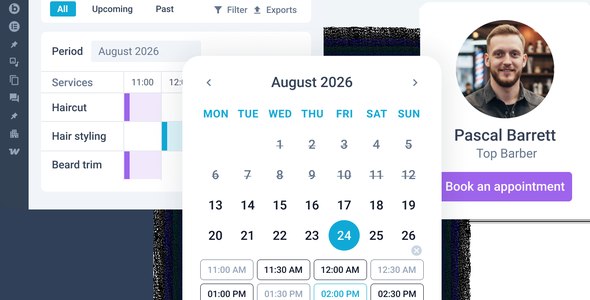
Appointments in WordPress usually mean adapting your design to the booking plugin’s templates. JetAppointment inverts that: built for Elementor, it lets you template the providers, services and booking forms with the same visual tools as the rest of the site, while handling hourly scheduling, days off and buffer time underneath.
Version 2.5.3 of this WordPress plugin is available for download on this page under the GPL license.
Key features of JetAppointment
- Hourly appointment logic. Manage services, appointments and events on an hourly basis, with days off and buffer time respected automatically.
- Appointment layouts. Display appointments as a self-explanatory listing using Listing Grid and Dynamic Field widgets.
- Smart notifications. Choose what happens on submission — insert the appointment, send email, redirect to a page — so services book smoothly end to end.
- Custom templates. Design the front-end display of providers and services by applying your own templates to the Provider and Service fields.
- 12 custom field types. Mix and match fields to make each booking as informative as your workflow needs.
- Single-page booking and page breakers. Clients book straight from a provider’s page, and long forms split into clean steps.
- WooCommerce payments. Every Woo payment gateway is available for charging at booking time.
Who it suits
Salons, clinics, tutors and rental-by-the-hour services already on Elementor get scheduling without a design compromise. Crocoblock stack users combine it with JetEngine for provider databases and JetThemeCore for templates. The result: a booking flow that looks designed, not embedded.
JetAppointment free download: latest version
JetAppointment 2.5.3 is available for download here under the GPL license. Upload the zip, activate next to Elementor, define your first service and provider, and embed the form — the first booking can arrive today.
Install from the zip file
Download the zip on this page. In WordPress, go to Plugins, then Add New, then Upload Plugin. Choose the file, click Install Now, then Activate. Stuck? See our step-by-step guide to installing a plugin from a ZIP.
Does JetAppointment support WooCommerce payments?
Yes. All WooCommerce payment gateways are available for charging on bookings, so appointments sell through the same checkout as the rest of your store.
Can each service have its own form fields?
Yes. Twelve custom field types mix and match per booking form, so a consultation and a repair visit each collect exactly the right details.
Can clients book from a provider's own page?
Yes. Single-page booking lets visitors book directly from a provider or service template, which pairs naturally with JetEngine-built listing sites.
Does JetAppointment require Elementor?
It is built for the Elementor workflow — forms and templates are designed there. The finest results come with JetEngine alongside for the provider and service data structures.
Is JetAppointment free?
No. It is a commercial Crocoblock plugin, sold individually or inside the Crocoblock suite.
JetAppointment vs JetBooking: what is the difference?
JetAppointment handles hourly, service-style appointments — consultations, treatments, sessions with providers and buffer times. JetBooking handles date-based rental booking — properties, cars, equipment reserved by the day. Same ecosystem, different clock.