
Elementor
Our take
Elementor lets anyone design pages visually, and its free version already covers most landing pages and simple sites. The things people often want next, such as custom headers and footers, popups and forms, live in Elementor Pro. It also adds weight to pages, so pair it with a light theme like Hello Elementor and a good cache.
Good
- Truly visual, drag-and-drop editing
- Large free template library
- Fine control over responsive layouts
- Huge community and add-on ecosystem
Watch out
- Theme builder, popups and forms are Pro
- Adds weight to every page it builds
- AI features use paid credits
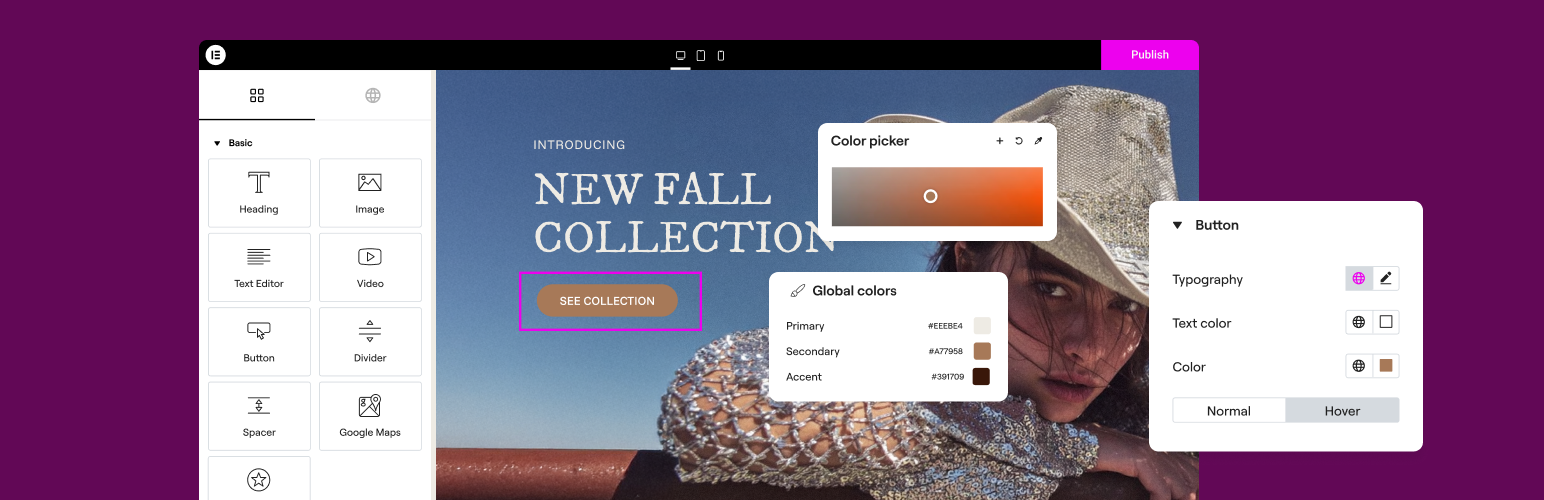
Elementor replaces the standard WordPress editor with a live, visual canvas. You drag widgets such as headings, images, buttons and columns onto the page, style them with controls for spacing, colors and typography, and see the result exactly as visitors will.
What you get for free
- Drag-and-drop editor with live preview
- More than 40 free widgets
- Library of page and block templates
- Separate settings for desktop, tablet and mobile
- Global colors and fonts for consistent design
- Version 4 with lighter atomic building blocks
Elementor Pro
Pro adds the theme builder for headers, footers and templates, a popup builder, a form widget, WooCommerce page building and many more widgets. AI features run on a separate credit system.
Install from your dashboard
In WordPress, go to Plugins, then Add New. Search for “Elementor” and click Install, then Activate.
Install from the zip file
Download the zip on this page. In WordPress, go to Plugins, then Add New, then Upload Plugin. Choose the file, click Install Now, then Activate.
Requires WordPress 6.8 and PHP 7.4 or newer.
Is Elementor free?
The core builder is free with over 40 widgets and templates. Elementor Pro adds the theme builder, popups, forms, WooCommerce building and more widgets.
Which theme works best with Elementor?
A lightweight theme such as Hello Elementor, Astra or GeneratePress, so the theme doesn't fight the layouts you build.